Screens and reflections: where to place skylights in Auckland living rooms with TVs and work-from-home desks
Auckland homes are doing double duty now.
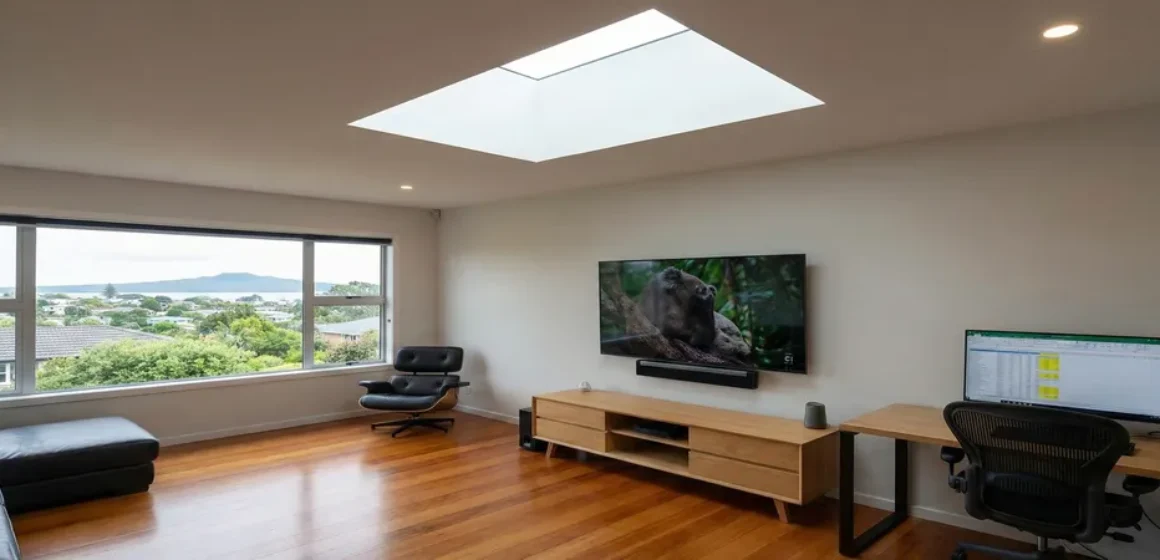
The living room is a lounge at night, a work-from-home zone during the day, and a screen-heavy space almost all the time. That changes how you should think about skylights. The goal is not just “more light”, it is light that does not fight your screens.
If you have ever tried to watch a dark scene with a bright reflection on the TV, you already understand the problem. It is not brightness. It is glare and contrast.
This guide shows you where glare comes from, how to plan skylight placement around TVs and desks, and what works best in Auckland’s mix of overcast daylight and sudden sun breaks.
The quick truth about glare (without the physics lecture)
Glare is usually one of two things:
- Reflection glare
You can literally see a bright patch reflected on the screen. - Contrast glare
You cannot see a reflection, but the screen looks washed out because the room is brighter than the image on the TV or monitor.
Auckland overcast days often create contrast glare because the sky is bright but diffuse. Sunny breaks often create reflection glare because direct sun can hit glass at strong angles.
The “screen first” daylight plan
Instead of starting with the skylight, start with how your room is used. Map these three zones.
Zone 1: The screen zone
TV wall, couch viewing direction, and the main line of sight.
Zone 2: The work zone
Desk position, monitor direction, and the hours you actually work.
Zone 3: The daylight zone
Where the room should feel naturally bright and lifted, usually the centre of the space or a circulation area.
A good skylight plan supports Zone 3, while staying out of trouble with Zones 1 and 2.
The Auckland living room screen test (10 minutes, very revealing)
Do this before you commit to placement.
Step 1: The black screen test
Turn the TV off during the day and look at it like a mirror.
- If you see bright window shapes and sky reflections already, a skylight placed in the wrong spot can amplify this.
- If the TV already behaves well, you have more freedom, but placement still matters.
Step 2: The 3pm west test
If your room is west-facing or north-west leaning, stand in the room around mid to late afternoon on a clear or partly cloudy day.
Ask:
- does sunlight hit the TV wall directly?
- does the room get a sudden “sun patch” that moves across the viewing zone?
In Auckland, those late afternoon angles are where glare complaints often come from.
Step 3: Desk reality check
Sit at the desk at your usual work time and look at the monitor.
If you find yourself constantly adjusting blinds or changing screen brightness, your daylight plan should prioritise controlled, even light rather than direct overhead intensity.
Placement rules that usually work (and why)
Rule 1: Avoid placing a skylight directly above or directly in front of the TV
If a skylight is positioned where it can reflect into the screen, you are inviting reflection glare.
A safer approach is often to place the skylight so it brightens:
- the centre of the room
- the ceiling area in front of the seating
- circulation zones behind the viewing direction
The goal is a lifted room without a bright source competing with the screen.
Rule 2: Prioritise ceiling wash over spotlight
When overhead light washes the ceiling and upper walls, the room feels brighter without harsh patches.
When overhead light spotlights one area, it increases contrast, which makes screens feel worse, even if the room looks “nice” in photos.
Rule 3: Treat the desk like a task zone, not a feature zone
For work-from-home desks, the best light is usually:
- bright enough for alertness
- even enough to avoid eye strain
- not creating reflection on the monitor
A skylight can help if it lifts ambient light in the room, but it should not create direct glare on the screen surface.
Rule 4: Plan for Auckland’s sun breaks, not only grey days
A plan that feels perfect on an overcast day can become annoying when the sky clears for 20 minutes and the sun hits at the wrong angle.
This is why placement and control options matter.
For a plain-English overview of skylight types:
https://www.skylights.co.nz/types-of-skylights/
Which skylight type tends to behave best around screens?
This depends on room geometry, but these patterns hold up in many Auckland homes.
Tubular skylights
Often useful when you want overhead light without a large bright glazing area. They can deliver effective ambient lift in small to medium spaces, especially when the goal is to brighten a dull centre zone.
Fixed skylights
Can be excellent when placed to lift the ceiling and centre of the room, but they need thoughtful placement to avoid creating a bright patch that competes with the TV.
Opening skylights
Chosen mainly for ventilation and comfort. If your room needs airflow as well as daylight, an opening skylight can be valuable, but placement still needs to respect screen zones.
For Auckland service context and planning:
https://www.skylights.co.nz/skylights-auckland/
Control options that keep the room flexible
In screen-heavy rooms, flexibility matters more than pure brightness.
Options that often help:
- a blind or control solution for times when sun breaks hit the wrong angle
- planning the skylight so the light spreads rather than lands hard on a single surface
- avoiding glossy finishes directly under the skylight if possible
This is not about darkening the room. It is about having a calm, usable room at 2pm and at 9pm.
A simple homeowner line that captures the goal:
Bright enough to feel alive. Soft enough to watch a film.
Illustrative Example Only: the lounge that became a glare trap
A homeowner added overhead daylight to make their lounge feel brighter on grey days. It worked, but the skylight placement created a bright reflection on the TV in late afternoon sun, and work-from-home calls became a constant blind adjustment.
The fix was not removing daylight. It was repositioning the plan so the skylight lifted the room without acting like a bright source in the TV’s reflection path.
Their reflection afterwards:
“It finally feels like daylight helps the room, not interrupts it.”
If you want a screen-safe recommendation, ask for a placement-led assessment
The right answer depends on:
- where the TV is
- where the desk is
- which direction you face when watching or working
- roof orientation and afternoon sun behaviour
You can start here:
https://inquiry.skylights.co.nz/inquiry
When you enquire, include: “TV and WFH desk in the room” and a quick note on whether the room is west-facing. That helps avoid glare mistakes from day one.
FAQs (unique to this topic)
Will a skylight cause glare on my TV?
It can if the skylight is placed where it reflects into the screen or creates strong contrast in the viewing zone. Good placement and light control can prevent most glare issues.
Is overcast daylight in Auckland still a problem for screens?
Yes. Overcast days can create contrast glare because the sky is bright and diffuse. Even without direct sun, the room can become bright enough to wash out a screen image.
Where should a skylight go in a living room with a TV?
Often in a position that lifts the centre of the room or ceiling area without sitting directly above the TV or in the TV’s reflection path. Placement should be assessed with your viewing direction in mind.
What about a home office desk in the same room?
The goal is even ambient light without direct reflections on the monitor. A skylight can help if it brightens the room generally, but it should not act like a bright source above the screen zone.
Do blinds help, or do they defeat the point of a skylight?
Blinds can be useful as control for sun breaks and late afternoon angles. The aim is flexibility, not darkness, so you can keep the room comfortable for screens and work.